December 2, 20187 yr #1 The Order of Liberation. The object of the Order was to “reward people, of the military or civilian communities, who will have distinguished themselves in the task of liberating France and her Empire. There were not many of these awarded. Around 1,050 or so. This example was brought home by an American officer in the late 40's early 50's. No name associated with it. I have shown this to a few collectors in France and they say this is the British made medal. These medals were struck by the Free French government while in exile in Great Britain. The remaining stock of these were sent to France after Liberation. Has various markings around the edges of the medal. The patches on either side are those of the 1st Free French Division. The Division was made up of troops from the French Colonies and mainland France. The divisions units were the first to rally to De Gaulle after France fell. They participated in the battles of Bir Hakeim. El Alamein and Operation Dragoon to name a few.
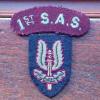
December 2, 20187 yr #2 Really cool! Love this medal and am hoping to get one myself one of these days! Are those badges leather? Is this also the 1st Free French Div.? The colours are reversed, though.
December 2, 20187 yr Author #3 Elizabeth, The patches are cloth with some type of heat applied emblem. I have not seen another to my recollection. Unsure on your reversed color patches. Have not seen that variation before either. Jack





Create an account or sign in to comment