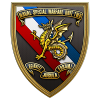
January 7, 20197 yr #1 Vichy France (Régime de Vichy) is the common name of the French State (État français) headed by Marshal Philippe Pétain during World War II. Evacuated from Paris to Vichy in the unoccupied "Free Zone" (zone libre) in the southern part of metropolitan France which included French Algeria, it remained responsible for the civil administration of France as well as the French colonial empire. From 1940 to 1942, while the Vichy regime was the nominal government of all of France except for Alsace-Lorraine, the German militarily occupied northern France. Following the Allied landings in French North Africa in November 1942, southern France was also militarily occupied by Germany and Italy to protect the Mediterranean coastline, the " Armistice Army " was stood down and dissolved on 29 Nov 1942. The Germans then occupied all of France. The insignia were produced in France using the woven technique. The Army wore the breast badge on the pocket on French army khaki uniform. Artillery Units Régiments de la Garde The fact that the Armistice Army existed for merely 2 years, makes these insignia difficult to find and very scarce. CDub





Create an account or sign in to comment