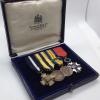
April 11, 20197 yr #1 John Thomas Joyce was born December 17, 1887 in La Crosse Wisconsin. In late 1915 he left his wife Flora and his two children (Margarite and Leo) to join the Canadian Expeditionary Forces. Joyce served with the CEF from 1915 to 1918. After the war he moved to Minnesota with his wife and children. Sometime in the mid to late 20s he remarried to Lelah Nye(not 100% on her last name as I had a hard time doing research) and moved to Illinois. He registered for the draft in 1942. To my knowledge he lived in Illinois until he passed away in 1962. From the research I have done. He never served in the United States military and was never eligible for the US victory medal. So I believe that the US victory metal is self awarded. From what other collectors have mentioned to the previous caretaker, these were mounted on their current bar sometime after 1980. September 30, 1915-February 15, 1916 Service number: 425565 Served with: 45th Battalion Canadian Expeditionary Force medically unfit discharge May 4, 1916-December 31, 1918 Service number: 261313 Served with: Royal Canadian Regiment 212th battalion 97th battalion in France and Belgium Sent from my iPhone using Tapatalk
January 14, 20206 yr #2 It is interesting that he was given the Virginia, Minn WWI service cross. That tells us that they honored their home town WWI veterans, even those who served with the Allied forces only.





Create an account or sign in to comment