Skip to content
View in the app

A better way to browse. Learn more.

World Militaria Forum

A full-screen app on your home screen with push notifications, badges and more.

To install this app on iOS and iPadOS
  1. Tap the Share icon in Safari
  2. Scroll the menu and tap Add to Home Screen.
  3. Tap Add in the top-right corner.
To install this app on Android
  1. Tap the 3-dot menu (⋮) in the top-right corner of the browser.
  2. Tap Add to Home screen or Install app.
  3. Confirm by tapping Install.

Will this fit into a M1 steel pot?

Featured Replies

#1

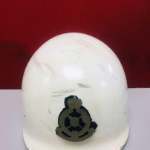
I wondering if these would fit in M1 steel pot as these look like later era M1 inner helmets. The white one is Malaysian the other Indonesian.

Also on the black one what do the strap markings mean?


(images form the internet)

topi_polis_antik_era_70an_1552426314_648fb968_progressive.jpg

topi_polis_antik_era_70an_1552426315_13fff68f_progressive.jpg

topi_polis_antik_era_70an_1552426315_39df7f59_progressive.jpg

topi_polis_antik_era_70an_1552426315_317b210b_progressive.jpg

topi_polis_antik_era_70an_1552426315_515c9514_progressive.jpg

topi_polis_tahun_1953_1609664280_0d5c7a97_progressive.jpg

topi_polis_tahun_1953_1609664280_5f509967_progressive.jpg

topi_polis_tahun_1953_1609664280_4537c824_progressive.jpg

Create an account or sign in to comment

Account

Navigation

Search

Search

Configure browser push notifications

Chrome (Android)
  1. Tap the lock icon next to the address bar.
  2. Tap Permissions → Notifications.
  3. Adjust your preference.
Chrome (Desktop)
  1. Click the padlock icon in the address bar.
  2. Select Site settings.
  3. Find Notifications and adjust your preference.