Skip to content
View in the app

A better way to browse. Learn more.

World Militaria Forum

A full-screen app on your home screen with push notifications, badges and more.

To install this app on iOS and iPadOS
  1. Tap the Share icon in Safari
  2. Scroll the menu and tap Add to Home Screen.
  3. Tap Add in the top-right corner.
To install this app on Android
  1. Tap the 3-dot menu (⋮) in the top-right corner of the browser.
  2. Tap Add to Home screen or Install app.
  3. Confirm by tapping Install.

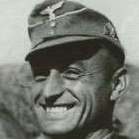
German soldier with wound badge

Featured Replies

#1

Hello everyone. Is there anyway to ID this soldier?  I don’t have much to go off and the photo is a lil blurry. Any help is  appreciated!

14DE5CB6-ABB2-4571-AA6E-1504B3BC7BDA.jpeg

#2

Unless its written on the back his name is lost to history barring a miracle.

#3

That looks like a nice M36 jacket.

  • Author
#4
53 minutes ago, Jack the Collector said:

Unless its written on the back his name is lost to history barring a miracle.

Yeah no name on the back unfortunately. Was hoping there would be a slim chance of IDing him somehow. How about rank? Officer?Thanks. 

  • Author
#5
On 2/15/2022 at 2:45 PM, Historybuff00 said:

Yeah no name on the back unfortunately. Was hoping there would be a slim chance of IDing him somehow. How about rank? Officer?Thanks. 

 

#6

Unteroffizier (sergeant)

  • Author
#7
7 hours ago, daskrieg said:

Unteroffizier (sergeant)

Thank you

Create an account or sign in to comment

Account

Navigation

Search

Search

Configure browser push notifications

Chrome (Android)
  1. Tap the lock icon next to the address bar.
  2. Tap Permissions → Notifications.
  3. Adjust your preference.
Chrome (Desktop)
  1. Click the padlock icon in the address bar.
  2. Select Site settings.
  3. Find Notifications and adjust your preference.