Skip to content
View in the app

A better way to browse. Learn more.

World Militaria Forum

A full-screen app on your home screen with push notifications, badges and more.

To install this app on iOS and iPadOS
  1. Tap the Share icon in Safari
  2. Scroll the menu and tap Add to Home Screen.
  3. Tap Add in the top-right corner.
To install this app on Android
  1. Tap the 3-dot menu (⋮) in the top-right corner of the browser.
  2. Tap Add to Home screen or Install app.
  3. Confirm by tapping Install.

Camo Luft M35 - USN bring back from Naples

Featured Replies

#1

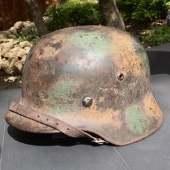
Hey guys! Here’s a cool one I picked up not too long ago from a gentleman I met at a local show. Tri-color camo M35 Luftwaffe ET64 (can’t make out the lot number). Although the pastel green and yellow scheme pops the most, it appears as though the soldier left certain portions of the helmet untouched, letting the original blue paint show through. I’ve been looking for examples online to compare this camo to but haven’t seen any so far, would love to see some other examples with a similar camo scheme! 

AE07A0A0-C29B-436A-B2B9-1511F3730F41.jpeg

74A1FCDD-6AE0-4C51-85D4-C49ED704F1C5.jpeg

5C56DA8E-BEBE-4468-8AA1-DD2613CEA8B4.jpeg

37DDCCBD-5E6D-4F87-A6D0-8F7F7FA5EEBD.jpeg

EC32B296-8745-403C-A5B1-45345B109A70.jpeg

AC7AF392-6AC0-4511-9B4A-F7356DFCE405.jpeg

83BAE59A-400D-4AAA-8D14-944F413A6C1B.jpeg

Apologies for the low resolution photos, will try to upload them in better quality… 

  • 1 month later...
#2

Nice

Create an account or sign in to comment

Account

Navigation

Search

Search

Configure browser push notifications

Chrome (Android)
  1. Tap the lock icon next to the address bar.
  2. Tap Permissions → Notifications.
  3. Adjust your preference.
Chrome (Desktop)
  1. Click the padlock icon in the address bar.
  2. Select Site settings.
  3. Find Notifications and adjust your preference.